
Getting Started
Small Medium Large (SML) is a component-based framework for building structured, flexible, and maintainable websites in Webflow. It combines reusable components, variables, and properties into a consistent development system.
The idea is simple: give developers control over the underlying structure and styling, while providing marketers with the tools to manage and expand websites independently.

Building with SML
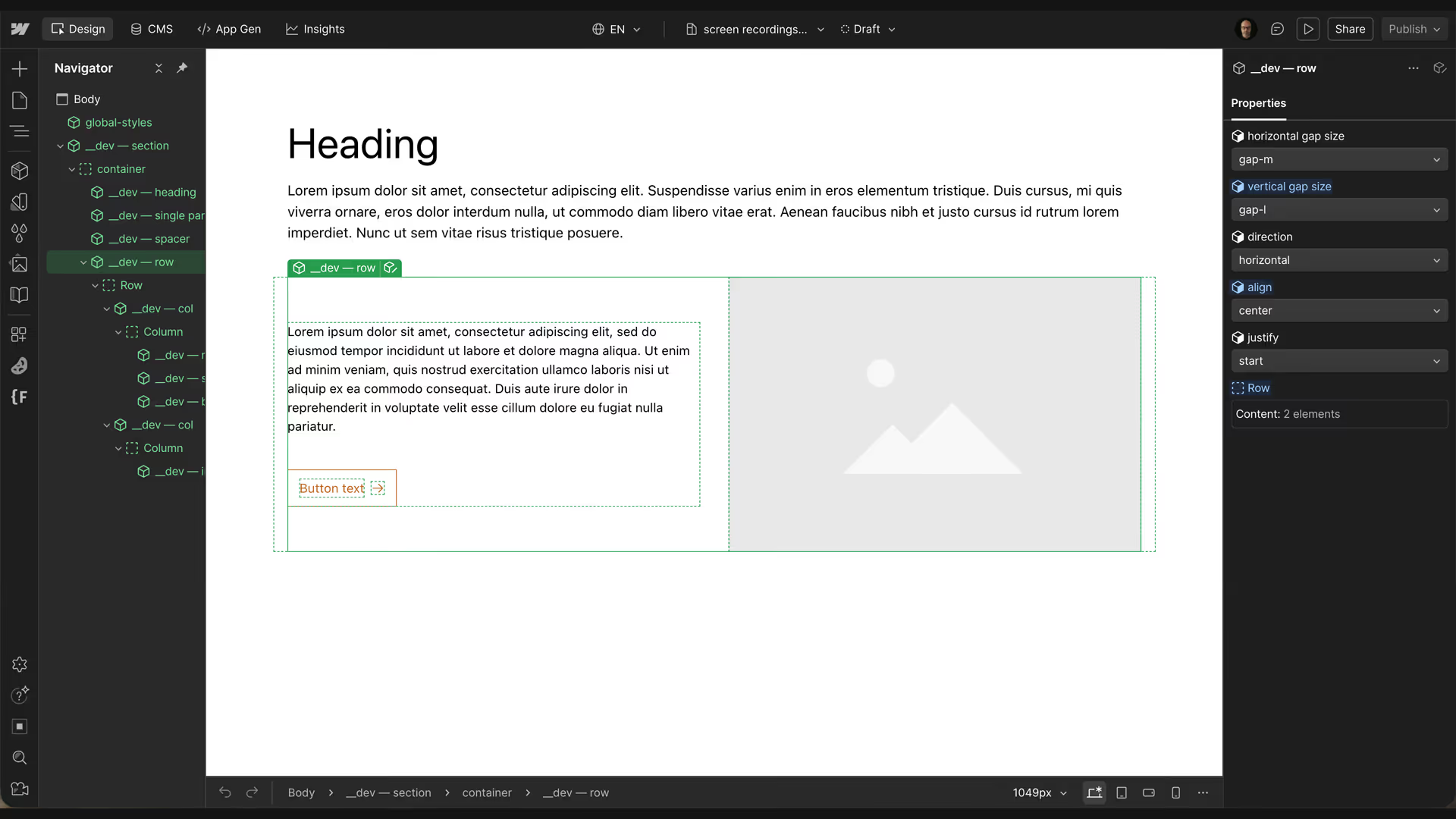
See how a section comes together using components, layout properties, and predefined variables.
What is SML?
SML provides a structured approach to developing websites in Webflow.
Instead of relying on large collections of utility classes or repeatedly building the same layouts, SML uses components with configurable properties.
These properties make it possible to adjust layouts, alignment, spacing, and other settings directly from the Webflow interface, without changing classes or writing CSS.
Behind these controls is a consistent set of rules that determines how components behave.
SML isn't intended to dictate how a website should look. It provides the foundation for building different designs while maintaining a consistent approach to development.spa
Built for developers and marketers
SML considers both the people developing a website and those maintaining it.
For developers
Developers work with a predictable structure, reusable components, and centralized styling.
Webflow variables manage shared design values, while component properties expose the settings needed to create different layouts and configurations.
The framework can be extended with project-specific components and functionality without changing its underlying approach.
For marketers
Marketers shouldn't need to understand the technical implementation of a website to work with it.
Through Webflow's Build Mode, developers can make selected components and properties available to marketing teams.
This allows marketers to create pages, adjust layouts, and maintain content using controls designed for their needs, while the underlying structure and styling remain consistent.
How SML works
SML brings together several parts of Webflow, each with a specific responsibility.
A consistent layout structure
Sections, rows, and columns provide the foundation for arranging content.
Sections contain the main content container, rows control how elements are arranged, and columns provide responsive width settings.
These elements can be combined as needed. A simple layout might only require a section, while more complex layouts use rows and columns.
Components and properties
Components provide reusable structures and functionality.
Their properties expose settings through Webflow's native interface, allowing users to configure components without modifying the underlying implementation.
For example, a row can be changed from horizontal to vertical using a dropdown property.
Variables and styling
Webflow variables manage shared values such as typography, colors, and spacing.
Component variants provide predefined styling alternatives, while CSS handles the behavior associated with component properties.
SML also keeps the generated HTML clean by only adding data attributes when a property differs from its default setting.
Together, these elements create a system that offers flexibility without losing consistency.
Where to begin
The documentation is organized around the different parts of SML. You can follow it from beginning to end or jump directly to the topic you're interested in.
Architecture
Understand the structural decisions behind SML and how layouts are organized.
Components
Learn how reusable components are built, configured, and extended.
CSS Classes
Learn how to use SML's predefined layout classes when working with native Webflow elements, such as Collection Lists.
Variables
Explore how shared styling values are managed across a project.
Typography
Understand the typography system, including responsive scaling and accessibility.
Responsive
Learn how SML approaches layouts across different screen sizes.
Conventions
Get familiar with the naming and development conventions used throughout the framework.
Build Mode
Learn how components and properties can be made available to marketers.
AI Integration
Explore how SML supports AI-assisted development through Webflow MCP.
If you're new to SML, Architecture is a good place to start. It introduces the foundation on which the rest of the framework is built.
