
Build mode
SML is designed to give marketing teams control over their website through Webflow Build Mode, without requiring access to the underlying structure or styling.

Developers can use SML to create complete, reusable Section components and expose only the properties that marketers need.
These closed components allow marketers to assemble and maintain pages independently while the developer remains responsible for the implementation.
From SML components to client-facing sections
SML's development components provide the flexibility needed to create different layouts.
For Build Mode, these can be combined into larger components representing complete page sections, such as a hero, testimonial section, or feature grid.
For example, a hero section might contain:
- A Section component.
- A Row with two Columns.
- A Heading, Paragraph, and Button in the first Column.
- An Image in the second Column.
The developer configures the layout, responsive behavior, and styling. The resulting Section component exposes only the settings a marketer should be able to change.
Creating a client-facing Section
SML's development components can be combined into complete, client-facing Section components. These provide marketers with a controlled selection of properties while keeping the underlying structure intact.
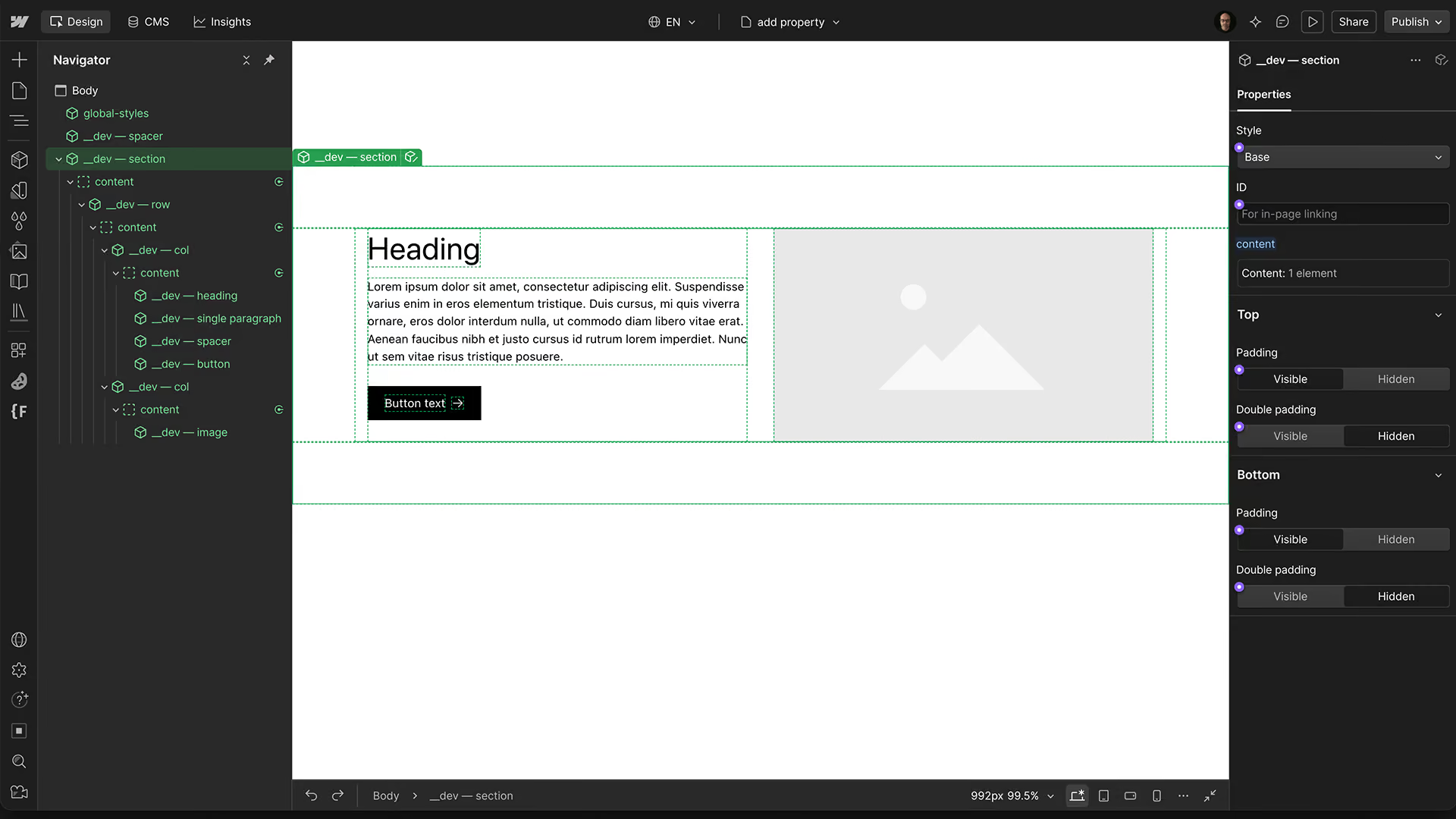
Step 1 — Build the section
Assemble the layout using SML components and configure its styling and responsive behavior.
Once complete, select the Section component in the Navigator and wrap it in a Div Block.
Convert this wrapper into a new component.
Step 2 — Name the component
Use the naming convention Section — ..., followed by a description of the section.For example:This makes the components easy to recognize when marketers assemble pages.
- Section — Hero
- Section — Features
- Section — Testimonials
This makes the components easy to recognize when marketers assemble pages.
Step 3 — Select the available properties
When creating the component, Webflow automatically detects the properties available in its nested components.
Instead of exposing everything, deselect the main Create properties checkbox.
Then select only the properties that marketers should be able to change.
For example:
- Heading text and size
- Paragraph content
- Images
- Button labels and links
- Selected layout variations
Leave developer-specific settings, such as column widths, alignment, and spacing, unselected unless the section specifically requires them.
Step 4 — Add visibility and layout logic
Once the properties are selected, configure how the section should respond when elements are hidden or changed.
For example:
- Hide paragraph: Hides the paragraph and its accompanying spacer, preventing unnecessary empty space.
- Hide button: Hides the button and any spacing used exclusively for it.
- Hide image: Hides the image Column and allows the remaining content Column to expand to full width.
These behaviors can be configured through component visibility settings, conditional properties, and the corresponding layout rules.
The marketer only needs to switch an element on or off. The component handles the resulting layout.
This is particularly useful for sections with optional content. A hero can contain a heading, paragraph, button, and image, but still work correctly when only some of those elements are used.
The developer defines the available combinations and ensures that each produces a consistent result.
Preparing Build Mode
Hide development components
Once the client-facing sections are ready, open the Components panel.
In the Development group, select Hide all for Marketers.
This keeps SML's underlying components and internal helpers out of the marketer's component library. Only the approved, client-facing components remain available.
Page building
Use Webflow's Page slots in static pages or page templates to let marketers add, arrange, and remove the available Section components.
For sections containing repeatable content, Item components can be exposed through component slots where appropriate.
